Advanced Drawing > Revision Cloud, Round (Draw Menu)
|
|
Advanced Drawing > Revision Cloud, Round (Draw Menu) |
www.CAD6.com |
|
This command draws a revision cloud based on a circle.
The center point of the circle can be entered by clicking the mouse anywhere in the drawing.
The radius of the circle can be entered by clicking the mouse anywhere in the drawing at a point through which the circle should run.
The revision cloud is stored internally as an extended object. In order to be able to manipulate it using the same commands that can be used on surfaces, you will first have to resolve it using the Shape > Resolve Extended Objects command.
The revision cloud is assigned to the current layer. It also contains a reference to the current pen.
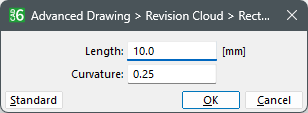
OptionsHow can I access information on this dialog?
The appearance and functionality of this dialog depends on how many objects have been selected: Why do dialogs differ depending on the number of objects selected?
|
CAD6studio Release 2026.1 - Copyright 2026 Malz++Kassner® GmbH