"Graph Unit" Dialog
|
|
"Graph Unit" Dialog |
www.CAD6.com |
|
How can I access information on this dialog?
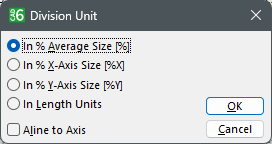
The available division units allow the user to use divisions in various ways.
A common division can be chosen with the first radio button. The length of a division line in this case is calculated as a percentage value of the average length of both axis. This unit guarantees a unique appearance of the graph independent of its size.
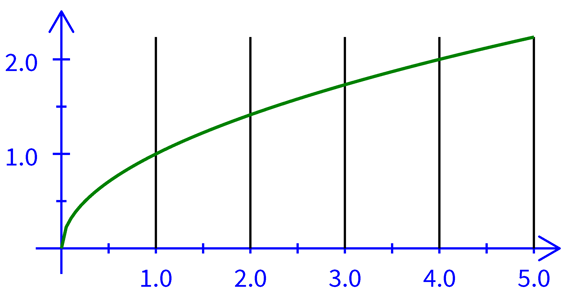
The second radio button selects a unit which allows the user to enter the length of a division line as a percentage of the full length of the X-axis. This unit for example can be used to present a X-division line length in good proportion to the full length of the X-axis. This also can be used for divisions of the Y-axis to put a grid in the background. For this, select the division line length as 100% and the Unit "In % of X-Axis Size [%X]". To align the grid properly (not centered) select the checkbox "Adjust At Axis". The result of this action is shown in the next picture. This setting is also independent of the size the graph has later.
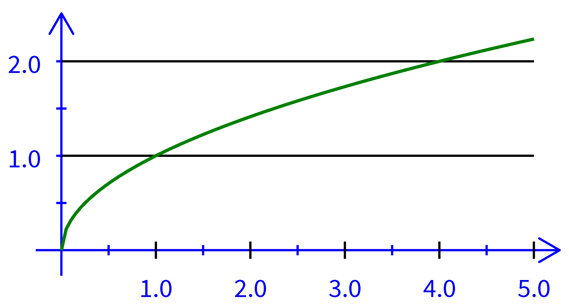
The third radio button allows the user to enter the length of a division line as a percentage of the full length of the Y-axis (The same process as previously mentioned). This unit for example can be used to present a Y-division line length in good proportion to the full length of the Y-axis. This also can be used for divisions of the X-axis to put a grid in the background. For this select the division line length as 100% and the Unit "In % of Y-Axis Size [%Y]". To align the grid properly (not centered) select the checkbox "Adjust At Axis". The result of this action is shown in the next picture. This setting is also independent of the size the graph has later.
The fourth radio button selects absolute length as a unit of measure. This unit allows the user to enter a defined length for the division lines in the current length unit. The selected length has to be kept in mind regarding the size of the graph entered by the user afterwards.
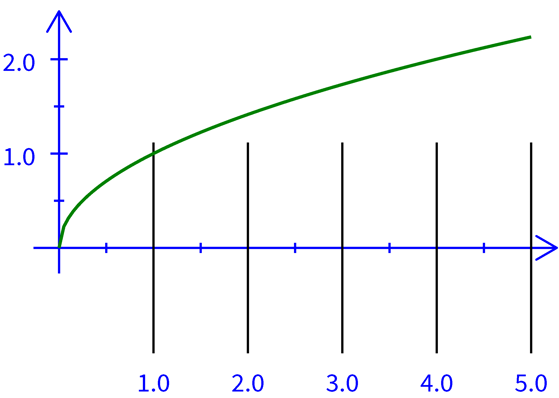
The checkbox "Adjust At Axis" enables the division lines to not be centered to the axis they divide, but in the same proportion like the parallel axis to the origin. The following picture shows the Y-grid from the example above without adjustment:
To get to know the various ways how to use these settings try to experiment with them.
|
CAD6studio Release 2026.1 - Copyright 2026 Malz++Kassner® GmbH